News | Forum | People | FAQ | Links | Search | Register | Log in
Modelling Help\Screenshots\Requests
It has always been difficult to get decent models for quake 1. So a thread where people can get advice on making models and post a work-in-progress for critiques is long overdue.

Any requests for models may well get met with silence. Specific requests will likely stand a better chance; "I'd really like a knight but carrying a shield" might be better received than "we need a mdler to join our mod remaking counter-strike for darkplaces".
First | Previous | Next | Last
 
Wow, thank you @JohnnyLaw & @metlslime, always good to get feedback on my articles, took me forever to create it. Made my evening! 
FLP, Re: Post 1271 
would a touch less dithering look better on the "shirt" area? 
 
@Shamblernaut
The shirt area needs more detail. As of now the shirt is almost one solid color without dithering. I plan on some leather straps and more variety and then I can get rid of this awfulness. I tried a few different conversion algorithms but I might need to push pixels manually in the end.

I've also prematurely documented some of the process while procrastinating.

Here's an overview of the stages the modeling went through.
http://pnahratow.github.io/chainforcer-lowpoly-modeling-stages.html

Here is a timelapse video of some texture painting.
https://youtu.be/SlOZWpu9t7o 
Great Work Flp 
Really digging everything you're doing. 
Nice Article 
Is there some sort of hybrid between nearest neighbour and dithering that works well?

It's been probably a decade since I had to use the (I'm showing my age a little here) reduce colour depth function in Paint Shop Pro.

Also, until I started watching your video just now, it never occurred to me just how silly it is shading on what really should be a dynamically lit model. 
 
@ Bloughsburgh, KillPixel
ty, very much!

@Shamblernaut
... it never occurred to me just how silly it is shading on what really should be a dynamically lit model

I must say I really disagree. Sure eventually you're going to be right. But given the years of ugly plasticy looking video game renderers we witnessed ever since normalmaps entered the jungle the handpainted artwork is one of the reasons why I like quake/old games so much.
Sadly, nowadays this kind of stuff has drifted a bit into the cartoonish world of games like Dota or Lol. 
 
True, the tech needs to be able to emulate what you would have been able to convey with shading. The benefit is that it is dynamic. Things like the reflection on your models visor should be dynamic rather than static.

But yeah, it was a comment on the ideal situation, certainly not what is best for quake. 
I Agree About The Visor 
Strong reflections do look very good in modern games and painting that stuff is in fact silly. 
No Need To Branch And Make My Own 
There is an updated version of the Authentic Models package after all. I didn't find it earlier, so I went ahead and made my own candidate version a while ago. This one is dated March 2nd and contains the new Shambler model.

http://www.quaketastic.com/files/models/auth_mdl13.zip

I don't need to make and publish my own after all. This one is by the same guy as the previous versions. 
Request/Modelling New Enemies 
Hello, I am Hiro-Hamada from Quakeone.com

considering this is a request fourm, here is my request:

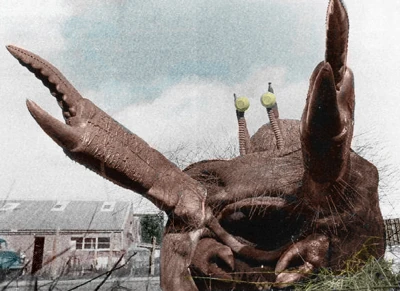
I am wanting to import a giant crab into Quake 1 darkplaces as a new enemy, and call it 'Macra'.

More info about the crab mod here:
http://quakeone.com/forums/quake-help/general-help/12114-hello-new-guy-here.html

crab can be found here: https://3dwarehouse.sketchup.com/model.html?id=aa0b6c19c73e14c269c25319f5f1c1e1

also, I am wanting to port a Special weapons Dalek that shoots rockets. It is to be a static model 
Continuing From Last Post 
Oh! forgot a few things!

here is the special weapons dalek model:

both Macra crab and Special Weapons Dalek are from sketchup.

also, I want the crab's pinchers (the part connected to the claws) to be a bit bigger, EXACTLY like in this image: http://orangecow.org/who-sprites2/macra-sm.jpg . I also once tried before to put the .DAE model of the crab into sketchup, but look how it turned out I was told that the conversion apparently went wrong... http://quakeone.com/attachments/forums/quake-help/general-help/2137d1461374844-hello-new-guy-here-crab-error.jpg 
 
^^ This Hiro-Hamada above is a ZDoom modder and he's picked up QuakeC real quick and already made a couple of nice weapon mods (no kidding -- he's a quick study).

He wants to convert models to .mdl or .md3 for DarkPlaces.

Told him not too many people who know modelling participate that much @ quakeone.com lately.

Can someone give him some pointers? He definitely seems the type that if someone gives him some tips, he might make something awesome. 
Re: Baker 
Oh! yes!

I am also a big Zdoom modder!

correct you are, baker!

I am also a teen with a bit of a short attention span, and big-time autism. So I must be able to understand the explanations fluently.

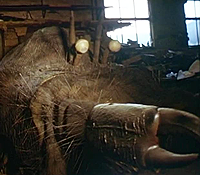
I have decided to do a different type of Macra crab model. The model itself does not exist, but these pictures provide what it looks like.

https://whoflix.files.wordpress.com/2015/02/macra-terror-shawcraft.jpg

http://vignette2.wikia.nocookie.net/doctorwho/images/0/01/Macra_terror.jpg/revision/latest?cb=20120222195739&path-prefix=es

http://www.dalek6388.co.uk/images/macra.png

here is how the macra crab moves regularly:
watch 11:02 to 11:37.
https://youtu.be/1M_t6okgEa0?t=663

To attack, it could reach out and snatch at it's opponent, this crab is not slow, but not too fast.

when he dies, his claws slam down, then his anntennes and eyes slowly look down, as if it's a robot shutting down.

and That's it for the Macra crab Description. 
Re: Baker 
Correction:

tried to turn the grenade launcher into a flame thrower, but failed. all I can do so far, is go into .QC files, attempt to mess around with them (usually ends up failing), edit death messages, and change sounds. 
Thats A Proper Start Of A Sucessful Modding Career I'd Say 
crab model needs more pixel density, less HD crab.
Go on! 
I Havent Tried Myself 
Indeed 
well, it could be turned pixel density by lowering the model polycount. which crab are you referring to? the one with visible legs, or the one that i showed in the 3 images (the one that has a big mouth, and 2 antennas) 
MDL Blender Exporter 
I Like The Concept 
I also agree that the first model you posted was too high poly for q1. The second concept (from the video you posted) looks would fit it to sewer maps or tight maze maps perfectly. 
Willy The Spider Was Crablike 
Perhaps you could use it as a base? 
Pic 
Re: Shamblernaut 
Yes! I think the Classic Macra would fit in good!

but could someone (other than me, for i am not too good at all at making models) make a model for it? 
There's A Bug In Several Custom Models Out There 
I've found out that several custom models out there have inverted lighting normals. This screws up with directional lighting in engines that supports it.
Here's a video.

Can this be a Blender exporter issue?

Rescaling the model in qME makes qME recreate the lighting normals, but the smoothness across non-continuous areas is lost, so it isn't a proper fix. 
 
That is some old skool investigation. Interesting. 
More Crab 
Ok, so, conidering my last post, what happens if you request someone to do a model the way I did on my last post, by simply asking (after giving info) Also, what is the best Quake 1 map editor out there? 
 
Jackhammer and TrenchBroom are the most commonly used map editors.

http://www.celephais.net/board/view_thread.php?id=60335&start=1284

http://www.celephais.net/board/view_all_news.php

Also: you are very new, the emphasis of this thread is more self-help and a good storage of information and helping someone already familiar with modelling figure out how to get them into Quake (which can be quirky). You can make requests, but the thread info also cautions those "may well be met with silence".

(i.e. if you are real lucky someone might "do it for you", but those would probably be something like a knight holding a different weapon or something simple and someone owes you a favor or likes your existing body of Quake maps that you have built).

You might consider getting familiar with map editors, maybe play some Arcane Dimensions (its open source, has a lot of monsters) and do some QuakeC tutorials.

http://www.celephais.net/board/view_thread.php?id=61270

https://www.youtube.com/watch?v=8YsKfkV6LV4

Doom monsters are just sprites right? Quake is far more complex than Doom and you probably should level up on mapping and QuakeC before walking down that hard road. Arcane Dimensions has quite a number of new monsters and the source code is with the download.

Arcane Dimensions has so much it can do, it should entertain you.

There is also Quoth:

https://www.quaddicted.com/webarchive/kell.quaddicted.com/ (Arcane Dimensions has some of Quoths monsters in it). 
Mankrip 
i know that the 3ds to md3 converter i use didn't generate normals at all unless i explicitly clicked a button to do so. i never actually noticed until sock pointed it out to me though. 
Darkplaces 'quake.exe' 
Ok, most quake modding tools request a file called 'QUAKE.EXE'

What is the 'QUAKE.EXE' Of Darkplaces? 
Darkplaces.exe Or Darkplaces-sdl.exe 
 
Ok, Got Darkplaces.exe. 
now, what are the:

-Base Game Directory

-Source Maps Directory

and

-Model Viewer

for Darkplaces Quake 1 Jackhammer? 
 
-id1
-where you put the maps you're working on
-where you put the model viewer software you're using, like qmE 
 
 
And if you don't have pakscape already, you better have it available.

https://www.quaddicted.com/files/tools/pakscape-011.zip

And probably texmex:

https://www.quaddicted.com/files/tools/texmex_34.exe 
Got QME 
but how do i use it? it says for windows 95 only, I am windows 7 
 
There is a qmelite.exe

Double click it. I am on Windows 7 and it works for me. 
 
Lastly:

As far as I know TrenchBroom doesn't have docs (nothing does except for ancient Worldcraft 1.6)

But entity stuff applies to any editor:

Tutorial: http://www.quake-1.com/wc16a-tutorial/

Entity reference: http://www.quakewiki.net/archives/worldcraft/entity/standard/standard.shtm 
Monster Design 
@Hiro-Hamada, I would recommend starting with the design of the monster first before modelling, especially if you plan to create the QC.

Think about its attacks, range or melee or both! Does it have any special ability? jumping, charging or stomp attack! What scale is the monster going to be? Can it fit through small gaps, drop off ledges or will it require special wide doors? What speed is this monster going to be? How aggressive will it be towards the player or other monsters?

All these considerations will affect how the monster is used and what animations, sounds and additional models it might need. 
OK... 
Already have the monster design (Post # 1296)

It's attacks are described (some sort of claw pinch) a video of it's animations is provided (minus pain, attack, and death) I described how it dies, It's range is a bit far (arm length) It's a bit of an aggressive crab, heck, the pictures of the monster is provided in post # 1296! and I already have all of it's sounds.

Additional Models? 
Additional Info 
Hiro-Hamada 
The best way to do such things is to do it yourself. You're certainly passionate about it, and that's the key to making a really great work. This will motivate you to learn how a modeling tool works, and by working on it yourself you'll be able to tweak all of the little details in it to make sure it'll come out as you expect.

It may seem intimidating at first, but actually it's the best way to get help. When you need to figure out how to do rigging, uv mapping and so on, people can help by giving answers or by pointing you in a direction where you may figure it out.

The creative work of translating such technical skills into an artistic design is something very personal, and the quality of the final result tends to be directly proportional to how involved the person working on it is.

I recommend taking a look at how flp progressed on his model here for inspiration. Follow his replies to see how things worked out for him. There's a good amount of information in that discussion. 
I Made A New SSG 
https://drive.google.com/open?id=0B9DxOfPvG2G1WlhGNXFNQ2ZieGs

With two finished weapons in about two years, I really like my chances of making a full replacement pack in this century. 
Dwere 
that looks bloody great. What was the other model you did? 
 
Ah nvm, I found it... the nail gun thingy that looked like a flak cannon! 
Bang Bang! 
I Made A New SSG
That SSG model would look lovely in the AD MOD!

Is there any chance you could add a second barrel flash for the V model? Also maybe add some more polygons for the firing trigger underneath the barrel for the G model? 
Thanks 
I made both shotguns a long time ago, but I didn't like them, as well as my SNG concepts, so I was discouraged from continuing. A few weeks ago I dug out the shotguns and thought they were salvageable. Although the work ratio between then and now turned out to be about 30/70%.

I'm still treating UV coordinates like vanilla Quake does, so they may be a little off in GLQuake descendants, but it shouldn't be too bad. 
Sock 
Yeah, I guess I could do both.

BTW, I noticed that animation frames and/or coding of the current double shotgun in AD are slightly off. It's possible to release the trigger and still see the muzzle flash without the gun actually shooting. 
Double Flash, Detailed Lever 
https://drive.google.com/open?id=0B9DxOfPvG2G1aFU2VlJFc1F0ZHM

Seems excessive for MDL and Quake as a whole, but what the hell. 
More Bang For The Buck 
Thanks dwere for the model updates, I have added them to the next AD update. If you can mail me some credit details that would be awesome. 
Baker 
TrenchBroom has a full manual available from the Help menu. 
Sock 
Can't think of anyone else to credit. Maybe except Winchester Repeating Arms, because I totally ripped off their 1887 model.

Unless you mean my name, but I dunno. Russian names look funny in English. 
 
I was doing some GLQuake skin optimizations, because the target engine is QS. Now I remember why I hate GLQuake. 
Adjustments 
https://drive.google.com/open?id=0B9DxOfPvG2G1Z3pGNHVGTmF0Qkk

GL-friendly. Don't like the lever, may still try and do something with it. 
Maybe Better, Dunno 
L337 Post 
If anyone is using my qmdl python module or the standalone fbxtomdl.exe converter, I recommend you trundle over to my blog and download the new versions.

https://tomeofpreach.wordpress.com/

The new versions incorporate several fixes to make exported models compatible with software-based engines, ranging from optimisations to visual corruption and even crashes! Thanks to Sock for his help in identifying the issues. 
Preach 
Can you add a fix for the skin normals?
A while back I've posted <a href="https://youtu.be/a73Z4JxKPko";this video</a> showing the problem. 
Normalisation 
What tool are you using which creates models with the backwards normals? Is it the fbxtomdl tool? Because I don't have the same issues with models I create from the main library. 
 
Those models aren't from me, they're from Skiffy and Capnbubs.

According to the readme, Skiffy used your MD3toMDL tool:
http://www.celephais.net/board/view_thread.php?id=61285&start=92 
 
If the normals are backwards does that make them abnormal? 
Pm To Mankrip 
Hi mankrip, can you drop me an e-mail? My address is on my profile. I wanna send you a model which you can check that the normals are correct on. If that's so, I'll need to get in touch with Skiffy and find out what's going wrong. Unless they have the pre-2013 versions of the tool which did have a bug in calculating normals... 
Preach 
E-mail sent. 
Weapons 
https://drive.google.com/open?id=0B9DxOfPvG2G1akY3SXFMV3BaSkE

I'll shove everything in one archive from now on. Making two versions of every model is rather butt, maybe I should stop.

Contains recent versions of shotgun, double shotgun, and nailgun. The shotgun has a pickup model that's useless outside of mods. 
By The Way 
I have a question. What are *.ms2 files generated by GLQuake? 
 
Nothing anyone should ever care about anymore. 
 
GLQuake reorders the model into the form that it sends to OpenGL (tristrips and fans), the ms2 file is that form cached that to disk.

Both the caching-to-disk (presumably it was faster in '97 to load the file from disk than to reprocess the model) and the rearranging into tristrips/fans are useless nowadays, so no engines do this anymore. 
Rant 
Okay, thanks.

I was just searching for a way to include GLQuake-optimized models with regular models in a single package that doesn't require tinkering in order to play with different engines. It was a stupid idea, but I wanted to make sure.

This situation with model skins does bad things with my motivation. I wish the habit of shifting texture coordinates died with vanilla GLQuake, but important engines retain it (while other important engines don't), and it's some sort of a standart now (just like not paying attention to garbage fullbright pixels). 
 
Nice.. 
Grenade launcher? Like the model. 
Clarification About Rant 
What do you mean with shifting tex coords? First time I've heard of that. Just being curious... 
Izhido 
Software Quake (as well as several source ports, including darplaces, strangely enough) places tex coords between pixels. GLQuake shifts them half a pixel right and half a pixel down, placing them at the pixel centers. Elaborate detailing goes out the window. Fitzquake/Quakespasm are also affected. 
@Izhido Instead Of Deja Vu ... 
Find the Quakespasm thread, do "show all posts" or start at 1 or whatever it is to see every one of the 2000+ posts.

Then in your browser Find look for the word "coord" and you'll find an informative discussion on this from a couple of years ago that discusses the differences that dwere refers to between software Quake and the hardware renderer versions. 
How Do Other People Cope With This Problem? 
Do you have techniques to minimize the damage? Or do you just work with one engine and hope your model won't look too broken with another? If it's the latter, then which standart do you prefer?

I was thinking about the former, and I can see a way to preserve symmetry where it's needed, but it'd require constructing the model in a certain way. Simply making something decent is hard enough for a novice, and then I have to worry about all this compatibility nonsense.

Why, GLQuake, why? 
Static Is No Weapon Model, But 
When I made the static entity for a convoybelt the hardest part was to make the cell_ammu blocks correspond to each other.

When they all four made the simultaneously movements and I had it right counting on the framenumbers the different engines all made their own movements.

Framegrouping helped, but as each engine treated it accordingly strange effects was the result. 
Dwere 
I'd go with designing your models with GLQuake in mind, for two reasons. The first is that so many more ports are based on glquake, and they're so much more widely used, that they've become the de facto standard now - even if the software vertex placements came first. Secondly, the software renderer has so many approximations and wobbles when it comes to alias models that it's not going to benefit from that level of care and attention.

As your screenshot seems to be going for a pixel-art look, I wondered if you could try doubling the scale of your skin. So each "pixel" on the visible skin would actually be a 2x2 block of pixels. Sure, you've effectively wasted 300% memory compared to the original, but the GL and Software renderings will be more alike. As a bonus, it might look less "muddy" for people not using nearest neighbour in the GL world. 
 
DirectQ and Darkplaces are using the original way of interpreting tex coords, so it's not that simple.

As for your second suggestion - IIRC, the software renderer can't work with skins taller than 128, so I'd have to redo a lot of things. In any case, I'd rather not resort to something like this.

Thanks for your thoughts anyway. 
Skin Height 
I believe the limit is 192? 
Might Be Worth Double Checking 
regarding max mdl skin height.

MAX_LBM_HEIGHT appears to be 480 in winquake/glquake, here.
Dosquake had a lower limit iirc. 
Skin Limits 
The limits for skins:

In DOSQuake the max is 200px (so 128px is the tallest power-of-two, the largest sensible size)

In Winquake, that gets bumped to 480px (so 256px is the largest sensible size)

I don't think you need to worry about DOSQuake, I'm pretty sure all the custom software engines start from a base of Winquake at least. For reference, Quoth has included models with 256 pixel tall skins since the first release and nobody has ever complained that it causes a crash.

Bit more of a pain that there are non-software engines emulating the old behaviour. For darkplaces you have the option of creating MD3 copies of your models, with UVs that match the GL versions. Which only leaves DirectQ... 
MD3 = Good Idea 
 
 
Does anyone still use DirectQ? I stopped using it about 6 month after I joined func_ 
DQ 
I stopped using it once development/support ceased. I would like to see quakespasm implement the HUD options that DQ had.

DQII was great, would love to see a final build with some of the loose ends tied up. 
Quake Trees 
I remember a request for tree static entities.
I am using some in my new map so
they may be also in others interest.

Quake trees 
Any Screenshots? 
 
Lazy Bone 
forest
<a href=""http://home.kpn.nl/lo2kf8/tree1.jpg">for</a>
<a href=""http://home.kpn.nl/lo2kf8/tree2.jpg">the trees</a> 
Crosslinked 
Arbitrary 
For some reasons statics that are under 1000verts ans 2000 tris won't show up in fitzquake.
Like these trees, there's one that shuts down fiztquake immediately when added to the progs.
It's just the same as the others but it won't fit. 
Has Anyone Tried Sprites For Trees In Nilla Quake? 
if not for the entire tree, just the foliage?

The trunk looks quite nice in those pics, but those leaves aren't so hot.

old sprite tree test 
 
I guess I'll just leave this here: http://www.celephais.net/board/view_thread.php?id=60831&start=994

Would be nice if more engines supported it :} 
 
Just one fairy sprite and you'll be able to recreate Ocarina in full :) 
Killpixel 
I like those...

Madfox, the trunks are ok but the leaves being giant squares don't seem to look right to me. I think what you've created would look good if there was masked texture support (where you put a { before the texture). 
Rift 
 
yes! 
 
#1372 - Thanks! full-on sprite trees probably aren't appropriate for vanilla quake, aesthetically speaking.

#1373 - those look nice, are the trunks simply brushes? that map reminds of something out of spyro. 
Full Sprite Tree 
Doesn't look that good. Can't be lit and breaks down when you're close. 
Convert Quake 1 Models To Skeletal - Keep Anims 
Has anyone done the conversion of the Quake 1 mdl files into a skeletal animation format? The idea would be to use skeletal animation skinned to a rig that would maintain a fairly close match to the original animations, for use in engines that don't support vertex morph animation. 
 
Thre are engines that do not support changing the values of the vertices of a model? Odd, to say the least... 
Q1 Models 
I converted several Q1 models into an animation studio by using a redrawn base model of (let's say) a death22 pose frame of a monster.

This is done by using a skeletal base bone and attached it over the new base frame.
From that point I can change it into any pose and export it into any commen format. obj,3ds etc.

So far so good.

I'm not familiar with vertex morph animation. 
Guns Of Okayishness 
I decided to take a break from original content and do something I wanted to do for a long time: touch up the existing weapons so that they look less broken in the modern era of neat, polished visuals.

Then I decided to take a break from that, so I'm releasing what I currently have: all view models except axe, one world model.

https://drive.google.com/open?id=0B9DxOfPvG2G1UDZtLXA1MXVSWlE 
 
By existing weapons I meant stock weapons, of course. 
Dwere 
some nice improvements. I like the extra shadows on the NG and RL.

The world LG model is really awesome. Love the little touches you've done there, like the cell ammo on the gun at the butt, super nice.

Not 100% sure on the more rounder LG. I think the sharper edges of the original make it feel a bit more violent maybe. It still looks nice but I'm not used to it I guess.

I'd say the SNG skin could be tidier on the bottom of the barrel but is otherwise nice. Similar on the SSG, looks better but the texture blending near the bottom of the barrel is a bit too sharp.

Cant see what's updated about the GL, it's a shame that the v_model was basically a cylinder. Would love to see a touch more depth to the model? 
Dwere 
I made a bit of a modification to the SNG skin to demo what I am talking about, it's not super clean because I'm not sure where the wireframe is exactly (lots of trial and error here).

https://www.dropbox.com/s/ykzofayufsec0vs/v_nail2.mdl?dl=0 
 
Yeah, the SNG bothers me too. I probably should've left the bottom connected to the barrel itself on the skin, but I wanted to avoid distortions after having problems with SSG. I don't want the barrel to look as monolithic as on your skin or in Arcane Dimensions, but the parts should be connected in a more natural way.

GL is pretty much the same. The mesh is less crooked, the skin was reorganized, the flash was redone, but those are subtle changes.

As for LG, I think it's pretty clear from the skin that those things were supposed to be round. Being square made them weird - I mean, I understand conserving tris, but in this case it looked ridiculous to me. I even considered smoothing them on the pickup model, but forgot. 
 
I did notice that you had redone the skins on each model, they're much easier to understand now, less wasted space on them.

I think the barrel of the SNG is probably better smoothed off at the end. It's subjective, I never did like the black holes at the bottom of the originals. 
 
Well, the black holes won't be black holes in any case - the main reason for updating the skin was to get rid of them. 
For Better Or For Worse? 
http://i.imgur.com/vMJuLHR.png

I didn't want to stray too far from the original designs unless absolutely necessary, but I dunno anymore. 
 
I kind of dig that actually. 
 
http://i.imgur.com/4bj2m3m.png

Took a break my ass. 
Dwere 
From a technical standpoint that is some really nice texture-work. From a purely subjective standpoint it looks a bit like a mans willy... Dr Manhattan's big blue one.


hahaha... sorry, I know you probably don't want to hear it cause you've put a lot of love into it. ;) 
+1 For Willies 
IMO all of quake's weapons should contain phallic design motifs. The rocket launcher always took pole position in my list of favourite slaying tools, and I like the fact that dwere is enhancing this aspect of the game. 
Quoth's Dildo Cannon 
needs to be usurped from it's big girthy, veiny, throne. 
 
I was well aware that a certain amount of people tend to see things in random elongated objects. When using elongated objects in art, one can only hope that none of those people would be brave enough to openly admit it.

BTW, don't blame me for SSG. It always looked like balls. 
 
I see dicks everywhere 
2 Models To Go 
https://drive.google.com/open?id=0B9DxOfPvG2G1Q2Z2a2Izd0ppWTQ

For those of you who were waiting for the Improperly Aimed Quadruple Dildo Gun: I'm sorry, but I had to partially cover it to avoid AO rating. 
Wow 
these are bloody awesome! The b-models are exceptional. I do hope that the grenade launcher gets beefed up a little on the v-model though, it needs to look as epic as the b-model.

Great work so far though! 
 
That was me btw... wasnt logged on 
Thanks 
I'm flattered.

I don't know what to do with v_rock. Tried adding a few more polys, didn't like it. I think I shot myself in the leg by making the SNG casing look so elaborate on the view model. Now other things look blocky. 
 
V rock is OK tbh. Has plenty of polys... It's the grenade launcher that's the problem 
 
I meant grenade launcher. Rocket launcher is v_rock2. 
 
There was a high poly one that looked good, cant remember where to get it now though. I think just turning some of the texture detail into actual geometry detail would be enough to improve it. 
Dunno 
 
I'd say that's an improvement. I guess it's preference really. 
#1402 
That's the best solution I've ever seen. Now it's just a matter of adding a small rounding around the edges of the darker gunmetal parts, and it'll be perfect. 
 
I think rounding would be too much. I'd rather leave it as it is (inlaid wood, simple corners), otherwise I'll have to do something with other models as well. 
 
You could bevel top edges. 
 
I know, I did, didn't like it. 
Khreathor Is Right 
What I meant is to bevel the edges. I didn't know the "bevel" word yet, I'm not a native English speaker. 
Latest Updates And Shit 
https://drive.google.com/open?id=0B9DxOfPvG2G1VmI4ck5HcHZ1Ymc

Axe seemed to have a potential to be a giant pain in the ass for a relatively small gain, so I decided to postpone it and go straight to the software mode testing stage. Some of the models crapped out much worse than I predicted, but I fixed the most glaring issues by adding redundant geometry.

Fixing the less glaring issues would require adding even more crap and mangling the shit out of skins. I felt bad enough while applying the basic fixes, so I probably won't go any further.

Compatibility issues always cheer me up. 
 
Liking the update so far. I think the bevel works well on the GL. 
Fitting Model Boundary's 
After days of tinkering in MAx3d I begin to remember what it was to import a quake1 model.

One is to find the right dxf exporter with quads.
HDXFEXP Export PlugIn
Designed (X) 1999 by hab.

Then after boning the model it seems as if the attachment won't bring up an animating scene.
The bones animate, the model also, but the animation bar won't respond.
It seems I can't make keyframes odf the imported mesh.

So I'm saving every frame for free, which is a rather long way for a pose.

But yes, I can add new models to an excisting original.
stupid ogre 
Dents OK? 
http://images.imgur.com/3nldAfK.png

Ironically, I spend 90% of my time tweaking things that 90% of people will never see (this is a FOV 110 screenshot). 
Dude... This Looks Fantastic! 
Now someone should increase brush count on all vanilla maps. 
 
Just wondering if there is any updates coming on mods or anything, that shotgun looks like it should fit in quite nicely mega/super super shotgun. I'm not saying that ad mod's version isn't good or anything, but feels a bit out of place. It's interesting to know that many of those guns were actually scanned, and they scanned mostly toys when id was working on gun models, so I can't say is that the most professional way to do it.. but I guess that can make quite unique guns. 
 
I think I preferred the symmetrical one. Actually I thought you were pretty much down with the models, I've been using them! 
 
I'm mostly doing compatibility tweaks now, but sometimes I see less under-the-hood things I'm not entirely happy with, so I change them as well. 
Fucking Lol 
 
I Love Game 
 
"boning The Model" 
I laughed. Sorry. I have a dirty mind. 
 
you need boned
 
Heh heh! Is that the same skeleton (recolored, it seems) that's in your Veni Vidi Fuzzi map? 
Snowflakes 
Static entity of 124 snowflakes on a 512x512 dimension.
Still a small glitch, but if I succeed to break the symetric patron
it could have a flakey environement.

Flakes are 8vert/12tris, the demo model of qmle.
Now there are 21 frames but it could vary to more.
If I lower it to half I could dazzle 248.
Hey Shambler
 
I'm afraid it will break when interpolation is enabled. First and last frame will do a weird interpolation, but I may be wrong. 
 
you could solve the rain lerping upwards for one frame by having the drop go to zero scale the frame before and after the upwards lerp.

-metlslime, general abuse thread

nice test, madfox. is it necessary for the flakes to be models or could they be sprites? 
#1426 
That sounds like black magic... but I like this attitude. 
Blizzard 
My first test was with a sprite, but as I haven't fixed the viewframe with it, it keeps turning.
When it are models of a small size it's easy to fill up 124 of them or even more. Only bad is animating as the lot gets me dazzled.

Strange falling startframe without framegroups.

in game 
Flakes 
I made the flakes smaller so the amount is larger. There's that strangle sizzle in the animation, as if the interpolation slides along the stroll. It makes no difference if I use framegroups or not.
So far I'm glad with the result.

Now I bit of turbulence. 
Are Those QC Or Engine Mod? 
Because the uniformity isn't great (I know it's only a test). And the white colour doesn't suit the quake aesthetic at all. It would probably work on a whole new palette / texture set though.

http://www.howtogeek.com/wp-content/uploads/gg/up/sshot4d2ab8c3eb126.jpg

The concept is interesting to me, I'm fairly sure particle effects would look nicer though. And would maybe be more "quakey". 
Snowflakes In #1428 And 1429... 
.. are a little bit too organized IMHO.
This would need a little bit more of randomness to show up like real snow fall... anyway...
Good try ! Keep it up ! 
Qc 
It's a static entity of 90 frames and caused by a qc-file. Result is a coloured skin I added, but my main concern is the interpolation.

I know it's been a point in earlier statics I made, but the ignorant collapsing of the first frame destroys the view of it.
It seems to make no difference if I framegroup or not, the first frame keeps on falling back.

They are surely too orginized, but I have to take a little care with the amount of triangles. They now are on 1525verts/1830tris.
So it's more a case of seeing the engine can handle the lots of flakes.

Particle effects would look better, but imagine, this static entity carries 305 flakes.
If it would be individual ones 305 entities would be needed. Now they're closed in as one. 
Madfox 
Just an another stupid idea how to make it more optimal.. would it be possible to make circle raycast check or something, from player to some range.. increasing range more and more, grouping snowflakes and giving them different alpha values.. or just making them much smaller until they dissapear from player's view.. after all player wouldn't notice that if done right. But that should make it much faster I believe.

Hopefully you get the point, sorry my terrible English skills. 
 
Madfox made a model.

Models can't do raycasting. ;-) 
 
nononono.. I mean program code? 
Trimming Quaker Flakes. 
I trimmed the flakes into a circling motion so the symetry is broken, but by scaling them out the shape of the flakes become to pronounced.

mdl

In game the large shape is rather out of place, or I should try to make them smaller.

@newhouse- I'm already glad I can spawn the static without typo's. My first idea was to use the viewport to project a transparanr sprite, but that wouldn't have depth.
Maybe a sphere that surrounds the player could catch up with a static ebtity, but as far as I know statics are lame. 
New Monster 
Axe Effect 
https://drive.google.com/open?id=0B9DxOfPvG2G1Y1BSWmRJMkczY1U

New: axe, grenade, nail, super nail.

Changes:

- Lots of tweaks.
- Played around with Edge Split, mostly for source ports that use Gouraud shading in a meaningful way.
- The view weapons should look semi-inoffensive in FOVs up to about 130. In Quakespasm anyway. The value might be lower depending on your engine and settings.

Then there are optimizations of various levels of retarted. They were supposed to make the models look better in software engines, Darkplaces, and the like, without affecting how they look in Quakespasm et al. Results:

- My sources are a mess.
- The result for software engines is underwhelming.
- Darkplaces and DirectQ look serviceable.
- I introduced a very subtle glitch in the intended engines.

Nevertheless, I think it was educational. I probably won't do that again. Making two versions of each model (just like I wanted from the start) would most likely be a better solution. I thought it would make a mess, but now I'm not sure which of the two evils is the better one.

One thing the latter approach would certainly help with is getting 100% OK result for each engine (instead of 99% for half of them, and 80% for the other half).

One thing the current approach is good for is a partial conversion with maps. I wouldn't want to complicate it with two possible setups. Another reason to not redo everything immediately is the fact that I'd have to go over the skins again just to be thorough. Ugh.

Despite all this, I more or less got to the point where I almost don't really hate this thing all that much, so I'm considering it to be one-point-zero. 
Downloaded, Will Try Later 
 
 
Incredible work Dwere !!
I like them very much.

If you need some comparism screenshots or gifs, please visit this page:
http://quakeone.com/forums/quake-mod-releases/finished-works/12408-new-faithful-weapon-rework-dwere-da-werecat.html

Thanks again,
Seven 
 
Heh, wow. Thanks.

Yeah, the gifs are appreciated, since I didn't make such comparisons myself (other than between versions, comparing new models to slightly older new models). 
 
Very good job, dwere. I'll stick to the hi-poly weapons I have installed but I can definitely see this as a default replacement for id's originals. Well done. 
Mugwump 
What is the version you're using ? Where can we find it ? 
One Point One Now 
https://drive.google.com/open?id=0B9DxOfPvG2G1YXRNZ0JqQVNHdTg

Fixed subtle glitchy seams where I found them. 
Barnak 
I'm using Ruohi's. Check this link: http://quakeone.com/forums/quake-help/general-help/10727-definitive-hd-replacement-content-list.html
They're the first entry in the "Weapons" section. Two .pk3s to drop in \id1, one for the equipped weapons in the player view and one for the pick-ups. If your engine doesn't support .pk3 format, just unzip them in \id1. 
Mugwump 
The link is akward to use, and I need a proper .pak file to work with Quakespasm. And I'm on OS X, so I don't have any tools to make pak files.

Please, could you give a link to a proper weapons PAK file for Quakespasm ? 
Barnak 
Awkward to use? Huh! In what way? I can access the page just fine, even on my phone. The dropbox links to the files are at the top of post #2. pk3 is simply a renamed zip, so you can extract the files and build the pak yourself using a program like PakScape - I have no idea what programs exist on Mac, so the research is up to you. If you still can't manage to sort it out, let me know and I'll see what I can do. 
Mugwump 
Thanks,

I successfully downloaded both pk3 files and unzipped them. I'm getting several prog and textures files, that I could drop into the prog and textures folders in the id directory, but they don't show in Quake. I'm not even sure that Quakespasm could use them. I'm unable to find any tools on OS X to make them in a proper PAK file for Quakespasm.

Is it possible for you to try to make a PAK version for Quakespasm ? That would be great ! 
 
Quakespasm complains about the wrong MDL version number. Apparently, these models are in a modified format or something. 
 
I made a pak with the files and tested it in QS. It doesn't work. Apparently there needs to be some modification to the progs.dat to make them work, but this goes beyond my knowledge. Use them in Darkplaces or search for info on how to make them work in QS. I'll upload the pak if you want but besides that, I can't help you further. Sorry. 
 
That second (allegedly more faithful) weapon pack works in QS (unpacked), but the external skins don't load. It makes some models black or indistinguishable from the stock ones. 
Thanks Mugwump 
No need to upload the PAK (unless someone else wants it), since it wont work in QS anyway. This is sad, since these HD weapons look awesome.

It would also be great to have an HD version of the HUD, in Quakespasm (I'm not asking HD textures for the game itself, i.e. monters and maps, since it would look ugly for that old game).

dwere, your weapon PAK is working great. The improvements are very subtle, though. Personally, I would prefer some higher HD weapons, since I have them "in the face" constantly, like the HUD. 
 
A quick glance at this thread http://quakeone.com/forums/quake-help/quake-clients/12339-quakespasm-hd.html and I found an answer by our esteemed Baker: "Quakespasm doesn't support model replacement textures." There you go. Maybe the Spiked version does?

For QS, use either dwere's pack or NightFright's Authentic Model Compilation. The latter will replace the original models of monsters, weapons and pickups with slightly higher poly versions while using the same textures.

Or switch to Darkplaces if you want to dabble in HD content, that's the best solution for now. 
 
The improvements are very subtle, though.

Well, that was the point.

I haven't tried myself at HD content yet. Well, excluding some embarrassing crap I made when I first discovered Tenebrae. Luckily, I had enough sense in me to not share it with anyone.

Maybe the Spiked version does?

The changelog doesn't mention it, unless I'm missing something. 
Subtle But Great, Dwere 
I'm sticking to Ruohi's for DP but your pack is definitely adopted for my QS. I find yours better than NightFright's, especially the axe, GL, RL and LG. Not sure about the big thingie you added on the handle of the SNG though, but I'll get used to it. 
Dwere 
In case you don't know, Seven created this thread http://quakeone.com/forums/quake-mod-releases/finished-works/12408-new-faithful-weapon-rework-dwere-da-werecat.html
There's a guy there complaining that your pack causes the demos not to play on vanilla/PSP. 
Erratum 
Upon closer inspection (I opened the pak file), it would appear that NightFright's pack does NOT replace the weapons. 
Crap 
I included quake.rc to modify some settings, and I forgot that it was based on an already modified quake.rc that didn't include the startdemos command.

I'll fix it later. 
One Point Two Already 
That's some rapid development!!!

https://drive.google.com/open?id=0B9DxOfPvG2G1YmNPUmRFMDV4YU0

From the changelog:

- Restored the startup demo sequence.
- Brought back the nozzles that were removed from the barrel tips of the nailgun (view model).
- Fixed fullbright seams on the view model of the super nailgun. 
Damn, That Was Quick! 
New link added to the QuakeOne page. 
Weather Report 
Knowing there's already weather additions to Quakespasm I continued my own versions with a static mdl file.
These were made with a one mdl file on a 512x512 surface.

rain
snow 
 
I think you should make snow with sprites instead. It's weird to see non-flat snowflakes, and you could use an actual snowflake texture for the sprites. As is, they look more like hail.

As for rain, if it's possible you should make it transparent to prevent this icicle look.

Good job anyway. 
Isn't Abyss Of Pandemonium's Code Open Now? 
It has rain and droplets when it hits the ground, maybe you should look into that 
Skin Addition Utility 
Does anyone know if there is a simple skin utility to add skins to a quake 1 .mdl file? Adquedit doesn't seem to be loading the palette correct anymore for me. 
 
Quake Model Editor 
 
Thanks Dwere, I'm using your grenade launcher and axe models now. That hand was pretty well done. 
Cool, Thanks 
 
 
I did that "refactoring" I was talking about.

https://drive.google.com/open?id=0B9DxOfPvG2G1NC15bnVkRjlmY0U 
 
Tweaks must be very subtle at this point, not sure what's changing! 
 
A pixel here, a pixel there.

Well, it's not that subtle, but, honestly, I don't even remember what I did between the latest versions, other than v_nail barrels being redone almost from scratch.

They look more or less the same though.

Really, 90% of my time I'm dealing with compatibility crap instead of improving the artistic aspect. Rant rant rant. 
 
Hah fair enough. It would be nicer to have one set of models really. Loving the models, using them mostly as the defaults now. 
I Don't Suppose Anyone Would Be Willing To Share Pre-installed QME3.1? 
 
 
Check Quaddicted. 
They Only Have The Installer Which Doesn't Work On Win7 
 
 
Try running the installer in compatibility mode.

Right click > Properties > Compatibility

Check the box and select an old version of Windows (probably 95 or 98/ME)

or use Compatibility Troubleshooter:

Right click > Troubleshoot Compatibility 
 
The Quaddicted 3.1 Lite download is a .zip file.

I use Win 7, all the executables in the .zip file run without doing anything except clicking them.

What specific file QME 3.1 file is not running? 
 
My guess was that the installer in qme30_full_installer.zip was the problem.

Often with older software the installer is more picky about the version of Windows than the program it's installing.

I have a strong dislike of programs that insist they must be "installed" and avoid them as much as possible. 
The Lite Version Says It Has Restrictions Though? 
 
@dwere 
These new weapon models are great! Not really a fan of the new g_rock (grenade item model) but oh well.

I'll start making new skins for the Mispack2 (rogue) weapons unless you've already started to. 
Thanks 
Folks at Quakeone already made alternative skins for both mission packs. I still want to make my own versions, eventually, but I haven't started yet.

Not really a fan of the new g_rock (grenade item model) but oh well.

I just didn't know what to do with the old design to make it appealing to me, so I started from scratch (not counting a little bit of Q3 for inspiration). 
It's All In The Retro 
I ran the installer in my '98 VM and it went through fine, then I ran the patch so now it says it's 3.1 preview 2. Am I allowed to post a link here? I zipped up the results and I can upload them somewhere if you're still interested Qmaster.

If I were to upload it, what would be a good file host that isn't likely to serve ads or dissappear in the near future. I noticed the http://www.quaketastic.com/ link at the top of Screenshots and Betas, would that be alright? 
Yes Please, Quaketastic Is Fine 


7-Zip can often open the contents of some installers, if you right-click and go to "7-zip->Open archive...". 
 
Unfortunately the version of the installer I've found "Cannot be opened as an archive". Regardless, there's a link to a fully patched installation in the post above yours so i'm not sure we need to worry too much now. 
Not Sure If OK 
Looks Good! 
The handle looks a bit out of place. That's all I have to say, I'm not a model or texture artist. 
Cool 
 
Importing An .mdl 
Extremely newb question:

How do I add a custom (static) entity to a map?
I've made a model:
http://67.media.tumblr.com/5437614355495b387dea15a1ea6e3b18/tumblr_ofgk3urXGE1usc8qto1_1280.png

And I got an add-on for Blender which exports to .mdl (seemed to work).
However, I have no idea have to add a custom entity to a map editor.
I tried TrenchBroom, because it seemed the most intuitive, but although I could see a list of entities, I saw no option to add any.

Sorry for asking what is probably a dumb question,
Help is much appreciated. 
One Way 
Quoth:

"classname" "mapobject_custom"
"model" "progs/yourmodel.mdl"
"spawnflags" "1" // Makes it static

https://www.quaddicted.com/webarchive/kell.quaddicted.com/quoth/quoth_tutorial.html#mapobject_custom 
Dumb As Bread 
Thanks for the reply Baker,

I'll try Quoth if I can't get it to work through TrenchBroom.

I found this TB addon, however:
http://leray.proboards.com/thread/3653/add-custom-models-trenchbroom-1

There's not much of an explanation, but the script format (in the def file) looks like this:

@PointClass base(Models) model(":progs/models@bits2@banner@tris.mdl") size(-16 -16 0, 16 16 52) = models@bits2@banner@tris : "" []

So, I thought I could try simply substituting the file path to that of my own.
Loading the def file in TB allows me to place an entity named after my file (just an empty cube), but loading up the map (in Quakespasm) I can't find any model.

(Also, what's up with the @'s in the file paths? Some python convention?) 
Well Fuk 
Tried adding a couple of entities from the normal ID1 def file (with 3D previews in TB and everything), but none of them would show in-game. 
 
You should probably ask map editor questions in the thread for that map editor.

I could tell you how to add a entity to a map, but knowing how to use your map editor of choice is something you have to bring to the party. 
Sorry 
Yeah, I wasn't sure this was the appropriate place to ask.

>I could tell you how to add a entity to a map
I'll try your way if you'd be willing to share?

I just want to see if I can have my model rendered in Quake, nothing more complex. 
 
If you want to do that and do it fast, use Pakscape to open quake\id1\pak0.pak and delete g_rock.mdl (make a copy of your pak)

Then put your model (renaming it) as quake\id1\progs\g_rock.mdl (make the progs folder).

Start Quake, load dm6 and go to where the grenade launcher would be.

That would be the fastest way to do what you want. 
Only In Quoth? 
In the future I may need to do this kind of stuff but I intend to map primarily for AD. 
 
Thanks a lot, Baker!
I'll try that!

@Mugwump
I was trying to edit the AD start.map in TB, without luck. I'm certain I'm just doing something remarkably stupid, though. 
Theon 
I see the TB add-on you linked is for TB1. You're not using TB2? 
 
@mugwup see line #222 in the ad_v1_42_readme.txt 
Thanks Baker 
 
Mugwump 
line 582 might interest you too. 
@Mugwump 
Yeah, I was using TB2, but hoped that it wouldn't be all that different. The addon seems to work (at leats it adds entity boxes to the entity browser).

Haven't been able to find any other tutorial...

Which makes me wonder:
How did all you Quake mappers even figure these things out? Back in the day, it must have been an insane puzzle to figure out on your own, but even today there doesn't seem to be much in the way of documentation and tutorials on how to use the map tools online.
Perhaps my google-fu is just weak, but I'm quite impressed with you all. Especially if you made maps through 2D views(!).

Also,
@Baker
Found this in the AD readme:
"Mappers : The editor .def and .fgd files supplied with this MOD require
: the worldspawn entity to have "no_item_offset" set to 1"

Yeah, I suppose I should've just tried a vanilla Quake map. Thanks for pointing this out. 
 
If you connected to #Terrafusion on QuakeNet (IRC) I suspect that these things that take you hours to figure out would instead take minutes or seconds because it is real time chat and anyone there has either made 10 maps or played 200 of them.

#Terrafusion was always the IRC home of the mappers that live here. 
Weapon Improvements 
Dwere,

Just want to throw a thanks for your efforts. I really enjoyed the new weapon improvements you made! 
 
Thank you, and you're welcome. 
 
I just emailed spirit with an updated installed for QME so that it will install on more modern machines.

That was one frustrating 3 hour rabbit hole. 
Treasureware 
Could it be that modern engines (win7) disturb older programms (qmle) to work properly?

IMHO now I understand a bit why my Abe'sOddWorld wouldn't play
on OS while it went fine on OSX, I blamed the program.

This after trying Wally, Texmex and QME with Win7 and WinXp,
older programs work best on what they were made for. 
Vwep 
So - I have the standard player.mdl, and a g_plasma.mdl, and I got into qme, and merge the g_plasma.mdl into player.mdl because I was to animate it on the quakeguy. The vertices get all fecked up, like so:

[url]http://i.imgur.com/oLYGSfN.png[/url]

[url]http://i.imgur.com/bJ54262.png[/url]

How do I fix this? What other ways of doing this are there? How did other people do it? 
My Way 
Beat way to fix it by move your object ie. g_plasma.mdl upwards.
Then export your all the frames by export multiple frames to another file.
Start a new object with import the frame you rised the g_plasma gun.
You will get a new model with a better skin file.
Import all frames back to the new model file. 
Also 
I uploaded q2mdl29b_alsoq1.zip to quaktastic/tools.
It is Quake2 modeleditor, but Quake1 also.
A bit stiffy, but a good reference in between qmle.
It might be strange, but quark4.07 was one with the first modelstudio.

I use them three when working on Q1 models. 
Stiffy?? 
English slang for an erection!! 
Your Heigh Ness 
My last convertions of models to quake1.

ncc1701
hubble 
Vwep 
@madfox, can you give me a step by step example as I'm not fully understanding what you mean. Thank you 
When I Use Merge I Get A Skinfile Included To The Original 
You had merged your g_plasmagun into the player model.

I tried the same appearance as your bj54262.png, loading player.mdl to rockrun3 and merge another weapon in.
As result I get a player with the weapon through its head, but on the skinfile I get one weaponskin extra.
In your png I see the right plasmagun skin, but there is interference with the player skin.

I can't restate the effect you result, as mine show the player with the extra merged weaponskin aside.
Can you send me the file of the g_plasmagun,mdl? 
Vwep 
Skin 
That was a bit of a hussle. I'm not exactly sure what happens, but for some reason the g_lavagun skin keeps interfering with the player skin.

I tried different placements of it in the merging file, but even from the corners it kept crunching the player's back.
For me I wouldn't mind, as it's just a small side of the gun. It takes more time to scale it and make it move accordingly the shotgun.(compare before delete).

I don't have an explanation for it, my weapons just load fully aside from the orginal.
Solution I found is load the model in the Quark4.07, clip the brushes in the skin view so you see vertex points light. Then slowly turn them back to left so they don't tresspass the ones of the player skin. Takes some skill

c0burnplayer 
Vwep 
@madfox, you're an absolute star. Thank you very much. 
 
You're welcome! 
AD Axe 
https://drive.google.com/open?id=0B9DxOfPvG2G1RDdoY0wtTzU5RW8

Changes: new hand, improved lighting, skin pixelings. The last one cost me the most time for the least amount of visible change, as always.

Source files are included. Ignore the hammer, it's unfinished. The stock id1 axe wasn't updated with the hand mesh and rigging improvements I made when molesting the AD axe, so it's a little obsolete.

I had to unmangle the original shadaxe from what the MDL format did to it, then the model was animated from scratch, and then it was mangled again during exporting => the shape might not be exactly like it was.

Since the hand that I made takes more space on the skin, I had to cut the second side of the blade. I could make the skin bigger, but I wanted its size to be power of two, and preferably not very ridiculous. I wanted to reinclude the second half for the pickup model, but I'm too tired after doing cruel and unusual things to 7 subtly different versions of the first half.

http://i.imgur.com/xdBH3Az.png 
Dwere 
That looks amazing, I use all of your weapon mdl revamps so I am excited to check this out later! 
 
The hand still needs work, I think. It was supposed to be the main (or even the only) improvement, but got neglected in the end. 
Thanks For The Models 
Dwere,

I want to let you know your SSG model is my favorite. Love the small details done there.

And to Skiffy,

Your HD shambler is irreplaceable and a must have whenever I reinstall quake anywhere. I hope you are still continuing with the vore work but I lost track of any updates/cancellations. 
SSG Model 
Which one? I made two sets - one stock-ish, one completely different (lever-action).

Regardless, thanks for the kind words. 
A Website 
Needs to be made for all these cool models! 
Wood 
The model with the subtle wooden details on the sides? At least I think it is wood!

Also that reminds me, I recall you talking about some animations or the like you use for Quake and shared them somewhere but I can't find where... 
 
This reminds me of the sock's updated SSG in AD (view model). Its forestock looks more like wood than the one on the original id model.

I like it, but it's not mine.

I made the 1.5 pickup model though, except the version that's present there is obsolete and I hate it.

Also that reminds me, I recall you talking about some animations or the like you use for Quake and shared them somewhere but I can't find where...

Not sure what those could be. Maybe someone else said it? 
Wooden Metal 
Nope it's yours!

I just tested and compared with 1.5 and then adding your pak. I was mistaken, the brown "wood" is from the subtle brown reflection or what have you that the detailing on the sides gives (My favorite part)

But AD's is indeed wooden I do see that now.

-Hmm, I have no idea about my other question it was just an offering in a random thread...oh well! 
Static Entitie 
I created a folder using a static model.
Therefore, a space with an additional block, in which there are two entities with their own skin.
The exterior is an animated sky texture space.
When I compile the directory without lighting, so good.
When I using light, the two models are suddenly the animated sky colored texture, not their own skin.

How can I avoid this, or doing wrong? 
For Clearance 
Never encountered this effect before with light.exe. 
Light 
Models take their light values from the surface directly below them. Even though a sky texture is always drawn at the same brightness, that doesn't give it a light level automatically. Replace the sky brush on the bottom of the map with a normal solid brush, add some lights until it is lit correctly and the models look OK, then place a thin sky brush on top of it to restore the appearance. 
Dark Matter 
I placed lights right under the info_static, but for some reason these only give a dim glow.
Covering the bottom brush seem to give the light a chance, but as it's such a large distance, I found my skill with the sky light in worldspan.

Thanks for the hint, Preach!

starlog 
Model Qc Help 
I've been modelling quiet some time now for Quake1 models, but there's one thing that keeps on erratum.

After creating my model frames according their position, and adding the corresponding qc in game the model refuses to die.
The first hits relate with blood gibs, but after three shots the model just animates on, without dying.

model 
Missing Parts 
The error is in wocat_die, and it's something that the function is missing. Compare it line by line to shalrath_die and see what is missing in your function. 
Yes 
forget statement, me donkey. 
2 posts not shown on this page because they were spam
First | Previous | Next | Last
Post A Reply:
Name:
Title:
Body:
message
question
exclamation
idea
flame
noflame
error
skull
beer
moon
pent
rocket
sheep
pacman
pig
cheese
worldcraft
gauntlet
crate
pitfall
pimp
smile
cool
sad
frown
oi
yay
tongue
evil
wink
neutral
q1
q2
q3
ut
hl
cs
doom
dkt
serious
cube
Website copyright © 2002-2017 John Fitzgibbons. All posts are copyright their respective authors.